Travian Android Bot: Setup, Login & Background Use
Use the Travian Panel Android app to manage villages on your phone. It includes a game window; it is not the desktop Chrome extension. Start with Google Play, or use the website APK for a separate direct installation.
Requires Android 8.0 or later.
Connect in three steps
Choose your installation source
Install from Google Play for store updates. If you already use the website APK, follow the APK update guide. Do not install that APK over the Play version or erase app data to force an update.
Connect the game after panel sign-in
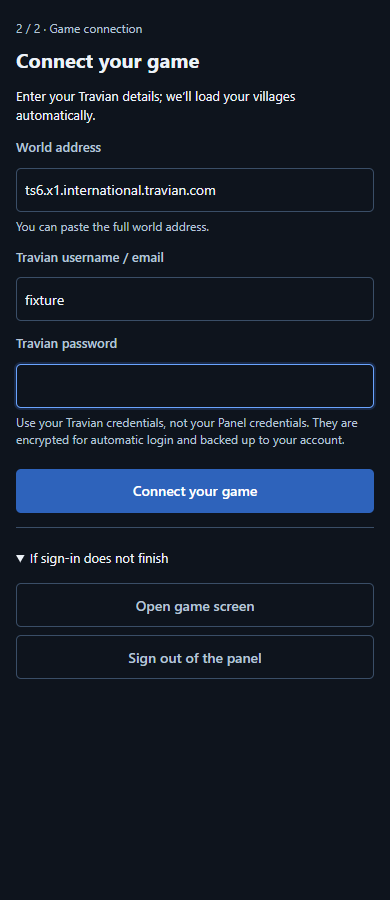
In the Travian Panel Android app (build 416 and later), incomplete setup or a confirmed expired game session opens the full-screen connection form. Enter your own world and game login details; saving starts automatic sign-in. An already verified, valid game session does not require this form.
Check villages before starting
Wait for game-session verification, village loading and confirmation of the server save. Cached village names alone do not prove that your game session is active. Complete any security check in the game yourself. Earlier builds may show the sign-in action under Bot Status or Settings.
Before the first task
A Panel account is not a game session
In the Travian Panel Android app (build 416 and later), incomplete setup or a confirmed expired game session opens the full-screen connection form. Enter your own world and game login details; saving starts automatic sign-in. An already verified, valid game session does not require this form.
Check villages before enabling a routine
Wait for game-session verification, village loading and confirmation of the server save. Cached village names alone do not prove that your game session is active. Complete any security check in the game yourself. Earlier builds may show the sign-in action under Bot Status or Settings.
Understand background operation and results
Android background restrictions, a closed game session or an unavailable execution device can delay work. Check the current task and next scheduled run. Advertising availability and game connectivity are separate: a missing ad does not prove that a game command ran.
Does signing out of Panel delete my settings?
No. Sign out of the panel disconnects your Panel account on this device without deleting server-saved settings. Sign back in with the same Panel account to retrieve them.
From a request to a verified result
- The web panel saves a plan on the server. Queued does not mean sent.
- The authorized Android app or Chrome extension needs a valid game session and connection to execute the task.
- Count only confirmed dispatches in the result. Check partial or uncertain results before making another request.
Illustrative example — not a live result
The default batch limit is 20 groups; an administrator can change it. Suppose 2 groups are confirmed: that means 2 dispatch groups, not 2 troops or 20 completed sends. Remaining targets may wait for separate checks such as trips already in progress, occupied targets, loot or loss limits. Check the relevant hero or troop settings and the result; troops at home alone do not authorize another send.
Practical questions
Why are villages empty after Google sign-in?
Google sign-in connects your Panel account, not your Travian session. Check the selected world, complete the game connection and wait for village synchronization. If it fails, note the exact message and app version; do not delete app data to retry.
Should I install the website APK over Google Play?
Keep the update channel you installed from. Google Play and the website APK are separate distribution paths. Use Play updates for a Play installation; do not uninstall the app or clear its data just to force an update.
Is Travian Panel really free?
Yes. Downloading and using Travian Panel currently requires no subscription or in-app purchase. Advertising funds the Android app. Travian's own paid features and items are separate.
Can the free bot work with every device offline?
No. An authorized Android app or desktop Chrome extension must be available with a valid game session. Saved plans remain on the server, but a saved plan is not proof that an action has run.
Is it an official or risk-free Travian bot?
No. Travian Panel is independent of Travian Games. Automation may conflict with the game's rules; review those rules before use. We do not promise protection from account restrictions or uninterrupted operation.